Now you can get an Indian IP address!
1. Download on your PC, Apple, Andoid or Amazon devices
2. Select India and press Connect
3. Enjoy Videos, Movies, Music, News and Games

Service announcements and VPN-related news.
1. Download on your PC, Apple, Andoid or Amazon devices
2. Select India and press Connect
3. Enjoy Videos, Movies, Music, News and Games
Some Email providers are blocking our mailing system, so we kindly ask you to whitelist or add to your Address book (Contacts) our Email address: support@seed4.me
It is really simple and you need to do it once. Just select your Email provider and follow few steps 🙂
1. Join Seed4.Me (our service works on iPhone, iPad, Android, Mac, PC & Amazon Kindle devices)
2. Select South Korea and press Connect
3. Enjoy K-POP, Games and Food ^____^

You probably think the Private or Incognito window in Safari, Chrome, Firefox and other browsers is a protection tool, which hides your online activity and private data.
Sorry, but we want to tell that you are wrong! These browsers, visited websites and, of course, Big Brother are all know what you are doing and who you are.

Why Netflix Banned VPN and Proxy and How to Bypass It?
No doubt you already know about Netflix, but do you want to know why and how to restore your access to American content?

• Fast • Secure • On all your devices with one click |

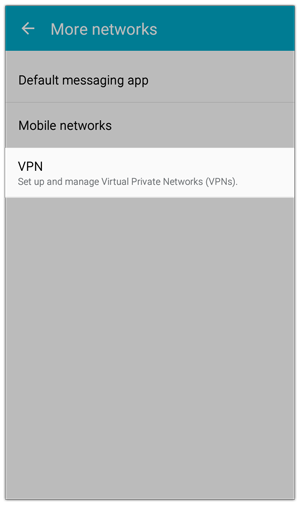
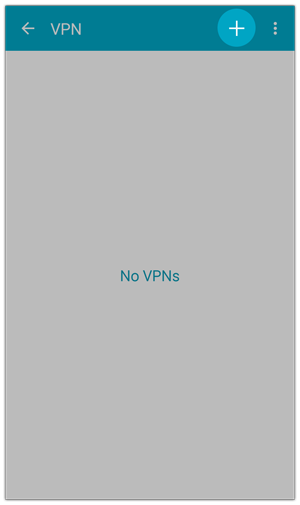
Step 1. Open Settings, More Networks, VPN. Now click on the Cross at the upper-right of the screen.
As far as we do not keep logs of the activity of our users, we must restrict certain port, including port 25 SMTP (outgoing), due to it could be used for the bulk SPAM sending.
We whitelist certain SMTP servers, which require an authentication, or are configured to ensure that relaying on our servers is not possible.
Therefor we are publishing series of configuration guides for well-know Mail clients.
First of all, you will need to have the following details, which can be supplied by your Email provider:
We continue our series How to manually configure your Mail client so it will work with Seed4.Me VPN service.
In most cases Thunderbird will provide simple Automatic setup of popular Email providers like Gmail, Yahoo Mail, Yandex Mail when you are creating a new account.
If it doesn’t work with the VPN connection, you definitely need to configure account manually and follow our instruction.
At first, make sure you have the following details, which can be supplied by your Email provider:
What can be worse than sharing your bank details with bunch of online services? We have asked ourselves the same question.
Please, do not give us your bank accounts or e-wallets information and simply use Bitcoins for anonymous and secure payments.
We want to be clear! It is …